


How to test Google AI Max (and know if it actually beat your control)
A blended cost-per-lead going down tells you the campaign performed. It does not tell you AI Max did. Here is how to run the experiment with the right guardrails, and the one report that tells you whether the feature actually contributed.
Table of contents
TL;DR
Most AI Max tests get marked as wins on the wrong number.
- When you enable AI Max, the campaign still contains all your original keywords doing their normal job, so a blended CPL dropping tells you the campaign performed, not that AI Max contributed.
- Run it as a 50/50 experiment against a held-out control.
- Optimise for offline conversions so it targets qualified pipeline or deals closed, not form fills.
- Decide your metric like cost per SQL, not cost per lead, before you see the data, and segment the search terms report by match type before you call it.
What is Google AI Max for Search?
AI Max is an optimisation layer you switch on inside an existing Google Search campaign, not a new campaign type. It adds three things: search term matching that finds queries beyond your keywords, automated text customisation, and final URL expansion.
Google’s own benchmark is 14% more conversions at a similar CPA with a footnote that excludes retail advertisers and is measured on campaigns already heavy on exact and phrase match. Read the footnote. It tells you the headline is conditional. Full detail is in Google’s AI Max documentation.
The feature is not the problem. How the test gets graded is. This piece is about running the experiment so you can find out whether AI Max contributed, instead of marking it a win on a number that was always going to improve.
Why a lower cost per lead does not mean AI Max won
We ran a clean test. A SaaS client, a 50/50 experiment, the existing campaign as control against an AI Max variant, offline conversion data flowing back from the CRM so the system was optimising to real customers and not form fills. Six weeks. The setup most accounts never get because the tracking is not there.
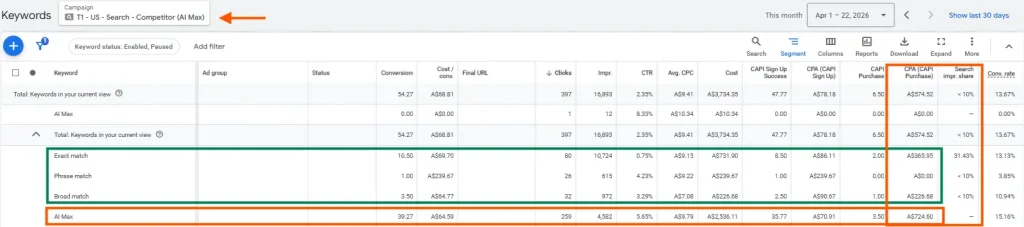
AI Max experiment
On the surface, the AI Max variant won. Lower cost per lead than the control. That is the number most people stop on, and it is the number that ends up in the recap deck.
There are two different claims hiding inside “AI Max won,” and a blended CPL cannot tell them apart:
- The account looks fine with AI Max on.
- AI Max is producing incremental pipeline the control would not have produced.
The first is a statement about the campaign. The second is about the feature. When you switch AI Max on, the campaign still contains every keyword you already chose, still doing its normal job at its normal efficiency. A blended CPL going down can mean AI Max found cheap, qualified demand. It can also mean your existing keywords carried the campaign while AI Max added expensive volume on top.
Both produce the same headline. Only one is worth paying for.
How do you know if AI Max actually worked? The match type report
Pull the search terms report for the AI Max campaign and segment by search term match type. Google labels the queries AI Max found on its own as a distinct “AI Max” match type, separate from the keywords you already chose. That split is the only view that isolates the thing you are actually testing.
When we ran it on this account, the picture inverted. The original keyword layer was performing exactly as it always had. The expansion layer was bringing in signups at a low cost, which is what dragged the blended CPL down and won the recap, but those signups were converting to customers at roughly twice the cost of the control. Cheap leads, expensive customers. The headline metric was measuring the wrong end of the funnel.
Nothing about the blended number was a lie. The campaign did perform. It just did not perform because of the part we were there to evaluate, and the only place that distinction is visible is the match type split. Most people never run it, because the headline already told them what they wanted to hear, and there is no incentive to go looking for a worse answer.
How to test AI Max properly with four guardrails
AI Max can earn its place. We have accounts where it does. But “on and not hurting” is not the same as “contributing,” and the difference only shows up if the test is built to show it. Set these before the experiment goes live, not after the recap.
| Guardrail | What it means | Failure mode it prevents |
|---|---|---|
| 1. Held-out split, not a switch | Campaign experiment, 50/50 budget against the existing campaign as control | Seasonality and budget shifts being read as AI Max impact |
| 2. Optimise to revenue | Feed offline conversions from the CRM so it targets pipeline, not form fills | AI Max finding the cheapest conversion event, not the valuable one |
| 3. Real window, real budget | Long enough for expansion traffic to convert to customers | Cheap leads flattering the result before poor close rates land |
| 4. Segment match type | Split the search terms report before calling it a win or loss | Crediting AI Max for volume the original keywords produced |
1. Run it as a split, not a switch
Use a campaign experiment with a 50/50 budget split against the existing campaign as control. Google’s AI Max experiments do this natively. Switching AI Max on across the account and comparing to last month is not a test — seasonality, budget changes and market shifts all land in the same number and you can attribute none of it. A held-out control is the only way the comparison means anything.
2. Optimise to the outcome that has money attached to it
If the system is optimising to form fills, it will get very good at finding people who fill in forms. Feed offline conversions back from the CRM so it is optimising to qualified pipeline or closed revenue, not the top of the funnel. Without this, AI Max expansion will reliably find the cheapest possible conversion event, and the cheapest conversion event is almost never the one the board cares about.
3. Decide the evaluation metric before you look at the data
Write down the number you will judge this on before the test starts, and make it a cost-per-qualified-outcome, cost per SQL or cost per deal, not cost per lead. Deciding the metric after you have seen the result is how the blended CPL wins. The metric chosen under pressure to show a win is always the one that shows a win.
4. Give it a real window and a real budget
Six weeks were enough here because the volume was there and the offline data closed the loop quickly. A B2B account with a longer sales cycle needs longer, or it needs to evaluate on a leading indicator it has validated correlates with closed revenue. A test that ends before the expansion traffic has had time to convert to customers will always flatter the expansion layer, because cheap leads show up immediately, and their poor close rate shows up later.
5. Segment match type before you call it
This is the one that gets skipped, so it is the one to make non-negotiable. Before the test is declared a win or a loss, pull the search terms report and split by match type. Look at the expansion layer on its own, on the cost-per-qualified-outcome metric you committed to in step three. If it clears that bar, AI Max is contributing and you scale it. If the blended number improved but the expansion layer on its own does not clear the bar, the campaign won and AI Max came along for the ride. Different conclusions, different decisions.
What to take to the recap
When the result comes back, the honest read is one of three:
- The expansion layer clears the cost-per-SQL bar on its own. AI Max is producing incremental qualified pipeline. Scale it, and keep watching the match type split as it scales, expansion efficiency tends to decay as volume grows.
- The blended number improved but the expansion layer does not clear the bar. The campaign performed; AI Max did not contribute the win. Leaving it on is defensible if it is not dragging efficiency, but do not put it in the recap as the reason the number moved.
- The expansion layer is actively worse and pulling blended efficiency down behind an acceptable-looking headline. Turn it off, or constrain it hard, and document so the next person does not rerun the same test and reach the same wrong conclusion.
None of those three is “AI Max won.” That sentence is the problem. It collapses a feature evaluation into a campaign result, and the two are not the same thing.
FAQs
We have had mixed results with AI Max, but more often than not it doesn't outperform core campaigns. That said, the idea behind AI Max is that it helps you find longer tail search terms you might not be targeting within your core search campaigns, which is particularly useful as search behaviour changes due to LLMs.
Cost per qualified outcome like cost per SQL or cost per deal closed, not cost per lead, and not blended. Decide it before the test starts. For accounts with long sales cycles, use a leading indicator you have already validated correlates with closed revenue, evaluated on the expansion layer in isolation.
Long enough for the expansion traffic to convert to customers, not just to leads. Six weeks works for a high-volume account with fast offline feedback. A longer sales cycle needs longer, or a validated leading indicator. Ending the test before late-converting traffic resolves will always flatter the expansion layer.
Not necessarily. “On and not hurting” is a fine reason to leave a feature running. It is not a reason to tell the board it worked. If the expansion layer is actively dragging efficiency, constrain or disable it. If it is neutral, leaving it on is defensible if it's bringing in net new traffic.



Nick Graham
Josh is our Head of Performance at farsiight, with over 10+ years experience in digital advertising.
Like what you read?
Learn more about digital, creative and platform strategies below.